
The Best AI Tools for Business: Which One Is Actually Right for Your Company?
ChatGPT, Claude, Gemini, Copilot, Perplexity, Make and Zapier compared by real business use. Learn when an off-the-shelf tool is enough, when to automate and when a custom AI solution makes sense.
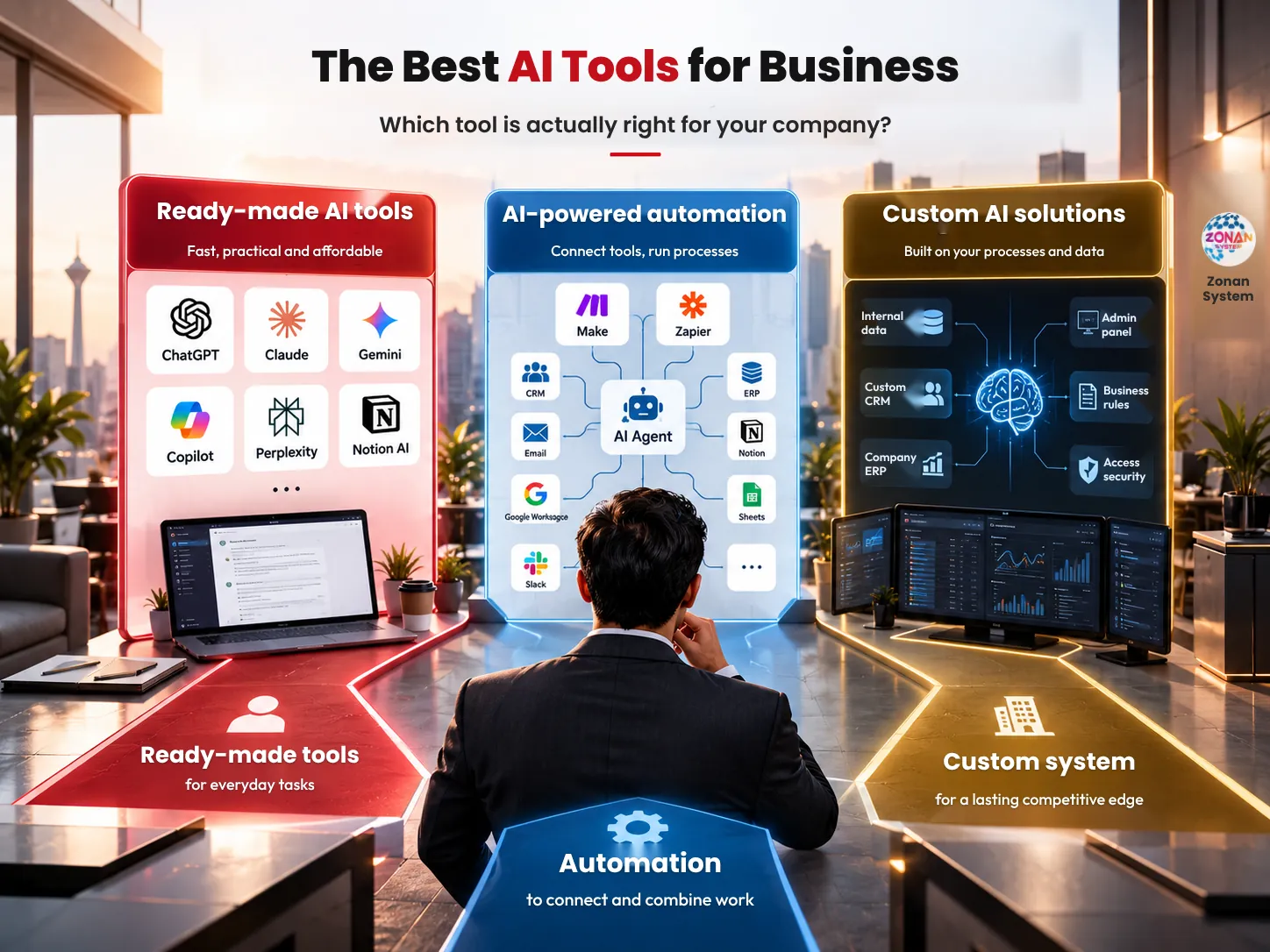
The director of a services company decides to get serious about using AI. The marketing team buys ChatGPT, one of the managers works with Claude, another department tries Gemini and, a few weeks later, Make and several other tools are added to the mix.
A month later, the company has more AI tools, but not necessarily a smarter business. Reports are still prepared manually, customer information is scattered across several systems, sales follow-up still depends on people and, rather than saving time, employees spend it switching between different tools.
This is exactly the point at which the question "what is the best AI tool?" becomes the wrong question.
A better question is: which business problem do we want to solve with AI, and to solve it, do we really need an off-the-shelf tool, automation or a custom solution?
In this guide from Zonan System, we look at the leading AI tools from exactly this angle — not based on market hype, but on how they are actually used within a company.
The best AI tool isn't necessarily the best-known one
Suppose a company's sales manager wants to increase the lead follow-up rate. Buying a subscription to a powerful AI model may help sales reps write emails or analyse conversations, but the company's core problem has still not been solved.
If the goal is for a lead to enter the CRM, have its details reviewed, be prioritised, have an appropriate message prepared, be assigned to the responsible rep and be followed up if the customer does not reply, we are no longer dealing with a "chatbot". The problem is about workflow.
So when comparing AI tools for business, the power of the model is only one criterion. Connection to company data, integration with existing software, security, the ability to define workflows and the cost of use at scale are sometimes more important.
It is this difference that separates an AI subscription from a real AI-powered system.
What exactly should we define before choosing an AI tool?
One common mistake is for a manager to choose the tool first and then look for a use for it. The logical path is exactly the opposite.
First, find a process that is costly, slow or repetitive — for example, answering similar customer enquiries, preparing a weekly sales report, categorising leads, extracting information from documents or drafting price proposals.
Then ask four questions: how often is this task repeated? How much human time does it take? Where is the information needed to do it? And if the AI makes a mistake, how costly is that mistake?
If the answers to these questions are not clear, comparing dozens of different tools is unlikely to lead you to a good decision.
Which AI tools are suitable for general company work?
The AI tools market changes so quickly that naming an "outright winner" makes little sense. The choice should be based on the company's technology ecosystem and the type of work.
Nevertheless, several platforms now offer a very broad range of uses for businesses.
Which businesses is ChatGPT suitable for?
ChatGPT should no longer be seen merely as a tool for questions and answers or generating text. The Business plan currently offers, alongside ChatGPT itself, Work and Codex capabilities, connections to services such as Google Workspace, Slack, GitHub and Microsoft 365, and an admin-managed workspace. OpenAI
For a company, its uses can range from file analysis and research to content creation, working with data, software development and carrying out multi-step tasks. OpenAI also states that Business data is not used to train its models by default. OpenAI
So for a company that wants a general-purpose AI assistant for several different teams, ChatGPT is one of the options worth evaluating.
When is Claude the better choice?
Claude is a strong option for work that involves reading, analysing and writing across large volumes of information. For its enterprise plans, Anthropic offers features such as centralised management, access control and enterprise security capabilities. Anthropic Support
In practice, Claude can be used to analyse contracts, documents, reports, internal guidelines, lengthy research and other knowledge work. Of course, the choice should be based on the company's type of data and workflow, not simply on comparing the quality of a single answer to a single prompt.
For a team whose work largely involves reading, thinking, analysing and writing, Claude certainly belongs on the list of tools to test.
Which companies does Gemini give an advantage to?
If your company's day-to-day infrastructure is built around Gmail, Drive, Docs, Sheets, Meet and other Google Workspace services, Gemini has an advantage that is not just about the power of the model: proximity to the environment employees already work in.
On Workspace plans, Gemini features are built directly into tools such as Gmail, Docs and Meet, with higher tiers offering more extensive capabilities. Google also states that Workspace protections apply to its AI features and that organisational content is not used to train models outside the organisation's domain without permission. Google Workspace
As a result, the best AI for a Google-centric company may not be the tool with the highest benchmark score, but the one that creates the least friction in employees' everyday work.
Which organisations is Microsoft Copilot suitable for?
The same logic applies to companies deeply embedded in the Microsoft 365 ecosystem. Copilot is integrated with Word, Excel, PowerPoint, Outlook and Teams, and Microsoft also offers Researcher, Analyst and ready-made agents in its business plans. Microsoft
For an organisation whose files, emails, meetings and day-to-day processes live in Microsoft 365, this integration can matter more than minor differences between AI models.
So the first selection rule gradually becomes clear: don't choose AI in isolation from the company's software ecosystem.
Which tool should we use for research and management decision-making?
Not every company problem requires automation. Sometimes a manager simply wants to gather and review reliable information more quickly before making a decision.
In this scenario, tools such as Perplexity come into their own. Its Enterprise plan offers, in addition to research capabilities, features for searching internal knowledge and organisational files, user management and privacy controls. Perplexity AI
For example, a business development manager can use an AI research tool to examine an industry, competitor, technology or new market, and then combine the findings with the company's internal data.
But there is an important boundary: AI research is an input to a decision, not a substitute for the decision-maker's responsibility.
Which tools are suitable for process automation?
So far, we have mostly discussed tools that a user logs into to get something done. The next stage begins when a manager wants work to move forward without employees constantly turning to AI.
This is where platforms such as Make and Zapier come into play.
Make now offers agents that can interact with CRMs, email, documents, databases and thousands of applications within workflows. The platform focuses on combining AI decision-making with visible, controlled automation. Make
Zapier also positions itself as AI-powered automation infrastructure and makes it possible to connect models such as ChatGPT, Claude and Gemini to thousands of applications and processes. Zapier
This is the key difference: an AI tool helps an employee do the work; an intelligent workflow can do part of the work itself.
Which AI tool is best suited to each part of the company?
For the marketing team, a general-purpose model such as ChatGPT, Claude or Gemini can be useful for research, ideation, campaign analysis and drafting content. But if the goal is automatic publishing, connecting to the CRM, processing leads and executing actions, we will probably also need an automation layer.
For managers, research and information analysis tools are more valuable. For teams that spend all day in Google Workspace, Gemini — and for organisations that rely on Microsoft 365, Copilot — can be the more important options because of their natural integration. Google Workspace
For the operations department, Make and Zapier become more attractive when the goal is to move information and actions between several applications. Conversely, if the process is highly specialised, none of them on its own may fully solve the problem.
So rather than building a simple "best and worst" table, it is better to choose tools based on the job to be done.
Why can buying lots of AI tools be a mistake?
Suppose a 30-person company buys two or three AI services for each team. The subscription cost is the first problem; the bigger problem appears when the organisation's knowledge becomes scattered across several accounts, prompts, files and tools.
Each employee finds their own way of working, there is no shared standard and sensitive information may be entered into different services without any clear policy. After a few months, the manager does not even know which tool has genuinely reduced costs or increased revenue.
This phenomenon can be thought of as a kind of AI sprawl: an accumulation of AI tools without a clear architecture.
In such circumstances, more tools do not necessarily mean more productivity; sometimes all that has increased is the number of browser tabs.
How important is information security when choosing an AI tool?
Suppose the sales manager enters customer files, the finance team enters revenue information and the HR team enters CVs and employee data into AI tools. From that point on, choosing a tool is no longer just a productivity decision; it is also an information security decision.
It must be clear where the data is processed, who has access to it, whether it is used to train models, what administrative controls exist and how employees' access can be revoked or restricted.
That is why the enterprise version of a service should not be seen simply as a more expensive version of the consumer tool. Features such as SSO, access management, audit logs, data retention and organisational policies become important at scale; for example, Anthropic offers such controls in its Enterprise plan, and Google has extended Workspace security controls to Gemini. Anthropic Support
The closer AI gets to the company's information and operations, the more data governance matters compared with the quality of the prompt.
Off-the-shelf tool, automation or custom solution: which should we choose?
A simple three-level model can help with the decision.
Level one is the off-the-shelf tool. If an employee wants to research faster, write text, analyse a file or get ideas, an off-the-shelf tool is probably enough.
Level two is automation. If several applications need to be connected and information or actions need to move between them based on defined triggers, tools such as Make, Zapier or custom integration development come into the picture.
Level three is a custom solution. If AI needs to work with your business logic, internal database, CRM, ERP, user access levels and bespoke workflows, simply buying a tool subscription is no longer enough.
This simple model prevents one of the most costly mistakes in AI projects: trying to solve a level-three problem with a level-one tool.
When does a company need custom AI?
Suppose a distribution company receives hundreds of orders a day. The manager wants a system that reviews orders, checks customer history, monitors stock levels, identifies high-risk customers and recommends appropriate action to the relevant department.
The problem here is not just "generating a response". The AI must connect to several information sources, follow business rules, have defined permissions, and have its actions logged and auditable.
In a project like this, the core model may still come from OpenAI, Anthropic or Google, but the real value lies in the layer that connects the model to your business.
This layer can include APIs, an access control system, a knowledge base, workflows, an admin panel, logging, human-in-the-loop controls and connections to the company's existing software.
This is where the role of a software development and AI team such as Zonan System shifts from "recommending tools" to analysing and designing the right architecture.
How should we start using AI in the company?
A good start is usually not buying ten different subscriptions. Choose one specific process that has sufficient volume, accessible data and a measurable output.
For example, say: "We want to cut the initial response time to a lead from four hours to fifteen minutes." That goal is far better than the vague statement "we want to use AI in sales".
Then run a small pilot and measure three things before and after: time, cost and quality of output. If the result is positive, look at connecting to other systems and increasing the level of automation.
This approach allows the company, instead of chasing waves of new tools, to build its technology portfolio based on real ROI.
Checklist for choosing an AI tool for your business
Before buying or implementing any tool, check the following:
- The problem to be solved has been precisely defined.
- You have a measurable success metric.
- You have identified what data the tool needs.
- You have checked whether it can connect to your CRM, ERP and other company software.
- You have read the data retention and usage policy.
- You have defined employees' access levels.
- You have calculated the cost across the whole team, not just for one user.
- You have tested the output quality in the languages you work in, using your own real data.
- You have measured how much human effort is needed to check the output.
- Before building a custom solution, you have checked whether an off-the-shelf tool solves the problem.
- Before buying several off-the-shelf tools, you have checked whether an integrated workflow is a better solution.
This checklist creates a small shift in perspective: from "what new AI has come out?" to "which problem is worth solving?"
Conclusion: the real issue is not choosing a tool, but designing the right system
ChatGPT, Claude, Gemini, Copilot, Perplexity, Make and Zapier can each be a valuable tool in the right place. But none of them is "the best AI tool for every business" simply because it is well known.
A company that works mainly with Google Workspace has different needs from an organisation whose infrastructure is Microsoft 365. A team that only needs research does not have the same problem as a company that wants to automate its sales, support or operations.
So the future of AI in business probably does not belong to the company that has bought the most AI tools; it belongs to the company that has built the best connection between people, data, software and AI.
Final thoughts
Choose the process before you choose the tool. Define your success metric before you automate, and before developing a custom solution, make sure the problem genuinely justifies custom development.
If your company has several processes that are candidates for AI but it is not clear which are best solved with an off-the-shelf tool, automation or custom development, the Zonan System team can first review your processes and existing infrastructure and then propose the right technical path — without the project necessarily starting with buying or building a new tool. Contact us to arrange a review.
Frequently asked questions
What is the best AI tool for business?
There is no single answer. The choice depends on your type of business, the company's existing software, the data involved and your goals; for example, a research team's needs differ from those of a sales or operations department.
Is ChatGPT or Claude better for companies?
Both have powerful capabilities. The choice should be based on the type of work, integration requirements, organisational management, data policy and practical testing on the company's own workflows.
Which tool is suitable for companies that use Google?
Companies for which Gmail, Drive, Docs and other Google Workspace tools are central to their work should seriously consider Gemini, because its AI capabilities are built directly into this ecosystem. Google Workspace
Is it safe to use AI tools with company information?
Security depends on the service, the plan, the settings and your organisation's policies. Before entering sensitive data, you should review the data usage terms, access controls, data retention and the security features of the enterprise version.
When are Make or Zapier better than ChatGPT?
When the main issue is moving information and carrying out actions between several applications, automation platforms can be more suitable. These tools also make it possible to add AI models to workflows. Make
When do we need custom AI?
When the system needs to work with your internal data, bespoke business logic, CRM or ERP, access levels and specific workflows, developing a custom layer can make more sense than using several off-the-shelf tools independently.
Zonan System Team
Software & AI team
Developers, designers and AI engineers at Zonan System, writing about practical AI, software development and digital business.
Need advice for your project?
Zonan System experts will guide you for free.



Comments (0)
Be the first to comment.